> For the complete documentation index, see [llms.txt](https://blocks-1.gitbook.io/blocks/llms.txt). Markdown versions of documentation pages are available by appending `.md` to page URLs; this page is available as [Markdown](https://blocks-1.gitbook.io/blocks/discord-server/collab.land-bot/claiming-a-token-permission-role-in-discord.md).

# Connecting to Collab.Land with a Mobile Wallet

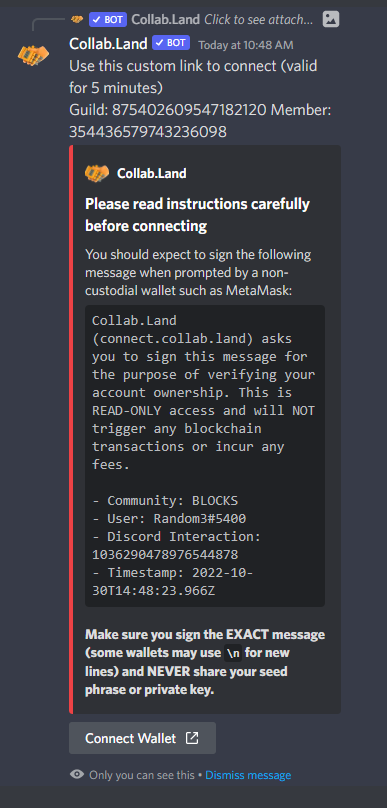
To leverage the Collab.Land bot, you will be asked to connect your wallet to the bot so it may verify you are the wallet owner.

1\) Start by entering the #collabland-join channel within Discord.

<figure><img src="https://2517435654-files.gitbook.io/~/files/v0/b/gitbook-x-prod.appspot.com/o/spaces%2F-MhPc3RZAqLavnBHLkIM%2Fuploads%2FUJBJx6oMRJ2uLsDGgeuz%2Fimage.png?alt=media&amp;token=381b02df-b24d-40bd-8958-820db9903a2a" alt=""><figcaption></figcaption></figure>

2\) Click Let's go!

3\) Click Connect Wallet

<figure><img src="https://2517435654-files.gitbook.io/~/files/v0/b/gitbook-x-prod.appspot.com/o/spaces%2F-MhPc3RZAqLavnBHLkIM%2Fuploads%2F4Ikf5O0HvetNii4dWFZr%2Fimage.png?alt=media&amp;token=2a4095a5-982c-493f-8424-5d8ef0cd3e18" alt=""><figcaption></figcaption></figure>

4\) Click Verify with a New Wallet

<figure><img src="https://2517435654-files.gitbook.io/~/files/v0/b/gitbook-x-prod.appspot.com/o/spaces%2F-MhPc3RZAqLavnBHLkIM%2Fuploads%2F6lkIvwtotnKGi83jVR8Y%2Fimage.png?alt=media&amp;token=24b01860-edc8-4f77-85b5-0859a0a45f67" alt=""><figcaption></figcaption></figure>

5\) Sign proceeding transactions using your Metamask or Humbl Wallet

**Video Example:**

{% file src="/files/xckArsNG8xc6yrO2o9g6" %}